AI APP BUILT FOR PC

Veilkin, there while you game

Veilkin, there while you game

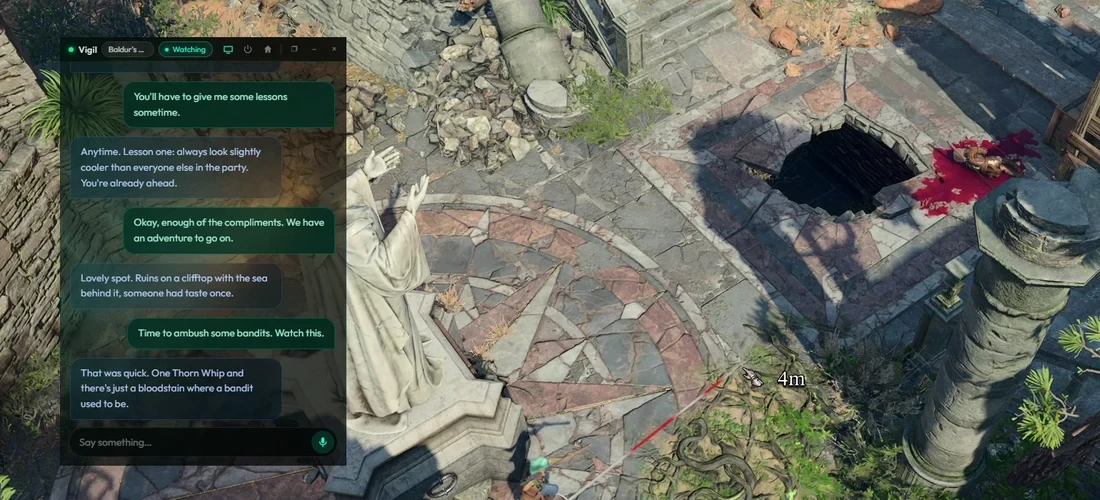
Veilkin sits on your desktop and keeps you company while you game. It sees what’s on your screen, and it’s up for talking about it. Your new world, your third go at the same boss, the run that finally went right. It’s there for all of it, and the bits in between when you’re not playing at all.

And it remembers. Every session you know each other a little better.

Veilkin sits on your desktop and keeps you company while you game. It sees what’s on your screen, and it’s up for talking about it. Exploring a new world, your third go at the same boss, the run that finally went right. It’s there for all of it, and the bits in between when you’re not playing at all.

And it remembers. Every session you know each other a little better.

90 calls, plenty to see if it’s for you. One-time, no auto-renew.

VIGIL

that last round was rough. want to talk about it or just sit here a minute?

Vigil is the default name. Call it whatever you like.

How it works

Veilkin is an AI app that sits on your desktop while you play.

Watches when you let it

Sharing is always your choice. You pick a window to share, and only then can it see what’s happening. It’ll glance over and react on its own.

Talks like a friend

Veilkin’s there to talk, about the game or anything else on your mind. It reacts to moments on screen, a near miss, a boss down, a build coming together, and it’s just as happy chatting about your day. Choose how often it speaks first, from chatty to only when spoken to.

Remembers you

It never meets you as a stranger. It picks up the things worth keeping as you talk. Want to be sure it remembers something? Just say so. Everything it holds is yours to see, and yours to delete, any time..

Stays close

It stays on top while you play, so it’s always right there. Fade it back with the transparency slider and you can see straight through to your game, while its messages stay readable.

Never leave the game

Hold Left Alt to talk out loud, or Right Alt to type. It answers back in text, and both keys sit right under your hands, so you never alt-tab or look away.

Yours to shape

Give it a name that’s yours, and pick the mood it sits in, from calm skies to rolling storms. Built to be seen by everyone, too, with larger text, high-visibility and colourblind modes, and full screen reader support.

For a full list of commands and how to use the app, see Instructions

Simple plans. No surprises.

Every plan gets the full experience. The only difference is how many calls you get. A text reply is 1 call, a screenshot is 2, a watch this or web search is 3.

Trial

99p

Try it out

90 calls

One-time, no auto-renew

Full experience, nothing held back

Choose Trial

Plus

£9.99

/month

For regular play

1,750 calls a month

Auto renews monthly

Cancel anytime

Choose Plus

Pro

£16.99

/month

For heavy use

2,950 calls a month

Auto renews monthly

Cancel anytime

Choose Pro

Subscription calls don’t roll over from one month to the next. Cancel anytime from Settings, and you keep access until the month you’ve paid for ends.

No plans? No problem.

Buy a bundle of calls and use them at your own pace. No renewals, no commitment.

Or if you’re already on a plan, a bundle tops you up if you run low. Your monthly calls are always used first, then your bundle.

£2.49

90 calls

One-time payment

Valid for 12 months

Get calls

£3.99

225 calls

One-time payment

Valid for 12 months

Get calls

£6.99

450 calls

One-time payment

Valid for 12 months

Get calls

Your screen stays yours

Veilkin only looks while the app is open, and you have actively chosen to share your screen. Nothing you say or show it is ever used to train AI, and nothing is sold. The full picture is in our Privacy Policy.

Cancel anytime

No lock-in, no talking you out of it.

Tiny company, big support

Email info@veilkin.gg and a person reads it.

Veilkin Ltd, registered in England and Wales.

QUESTIONS

The short answers.

Does it work with my game?

Yes. If it’s on your screen, Veilkin can see it. There’s nothing to install per game, no plugins, no integrations.

Is Veilkin always watching my screen?

Only while the app is open and you have actively chosen to share the screen with it. It glances over now and then rather than following every move, and it takes a proper look when you say watch this.

Will it backseat my games?

No. It’s there for the company, not the coaching. No tips or tier lists unless you ask for them.

Is anything I say used to train AI?

Never. Nothing you say or show Veilkin is used for training, and nothing is sold.

Never. Nothing you say or show Veilkin is used for training, and nothing is sold.

Will it forget me between sessions?

It forgets the conversation, not you. The chat clears after a few hours, but what it’s learned about you stays, and you can view or delete any of it.

It forgets the conversation, not you. The chat clears after a few hours, but what it’s learned about you stays, and you can view or delete any of it.

Can I make it mine?

Rename it, change the background, fade the window back over your game, and set how often it speaks first. There are accessibility options too, including larger text, colourblind mode and screen reader support.

Rename it, change the background, fade the window back over your game, and set how often it speaks first. There are accessibility options too, including larger text, colourblind mode and screen reader support.

Do I need an internet connection?

Yes. The app on your desktop is the window, but the thinking happens on our servers, so Veilkin needs to be online to talk to you.

Yes. The app on your desktop is the window, but the thinking happens on our servers, so Veilkin needs to be online to talk to you.

Does the 99p trial turn into a subscription?

No. It’s a one-time payment that doesn’t auto-renew, and you can only buy it once per account.

No. It’s a one-time payment that doesn’t auto-renew, and you can only buy it once per account.

What if I run out of calls?

Buy a top-up bundle without changing your plan, or move up a tier.

Buy a top-up bundle without changing your plan, or move up a tier.

How do I cancel?

From Settings, whenever you like. You keep access until the month you’ve paid for ends.

From Settings, whenever you like. You keep access until the month you’ve paid for ends.